


Gate perpetual futures offer the Reverse and Trigger Reverse features to help you quickly adjust your position when the market reverses, allowing you to seize market opportunities.
Reverse: When you anticipate a market trend reversal, you can use the Reverse feature to close your existing position at the current market price and cancel any unfilled orders. Then, a new position will be opened on the opposite side, with the same amount and leverage as your original position, at the current market price.
Trigger Reverse: The Trigger Reverse is an advanced version of the Reverse feature. You can preset a price to trigger the automatic position reversal. Once the price reaches the trigger point, the system will perform the reverse operation at the current market price, which involves closing the existing position at the current market price, canceling any unfilled orders, and opening a new position on the opposite side, with the same amount and leverage as your original position, at the current market price.
With the Reverse or Trigger Reverse features, you can swiftly respond to market fluctuations, avoiding cumbersome manual operations and enhancing trading efficiency. For example, if you hold a long position and anticipate a market decline, you can use these features to quickly close your long position and open a short position, and vice versa.
Gate perpetual futures offers Reverse and Trigger Reverse features to help you quickly adjust positions when market trends reverse, enabling faster execution and more efficient position management.
Reverse: When you anticipate a market trend reversal, you can use the Reverse feature to close your existing position at the current market price and cancel any unfilled orders in the same market. Then, a new position will be opened on the opposite side, with the same amount and leverage as your original position, at the current market price.
Trigger Reverse: Trigger Reverse is an advanced version of the Reverse feature. You can preset a price to trigger the automatic position reversal. Once the price reaches the trigger point, the system will perform the reverse operation at the current market price, which involves closing the existing position at the current market price, canceling any unfilled orders, and opening a new position on the opposite side, with the same amount and leverage as your original position, at the current market price.
With Reverse or Trigger Reverse features, you can respond quickly to market fluctuations, reduce manual operations, and improve trading efficiency. For example, if you hold a long position but turn bearish on the market, you can use these features to close the long position and open a short position instantly—and vice versa.
Gate perpetual futures offers Reverse and Trigger Reverse features to help you quickly adjust positions when market trends reverse, enabling faster execution and more efficient position management.
Reverse: When you anticipate a market trend reversal, you can use the Reverse feature to close your existing position at the current market price and cancel any unfilled orders in the same market. Then, a new position will be opened on the opposite side, with the same amount and leverage as your original position, at the current market price.
Trigger Reverse: Trigger Reverse is an advanced version of the Reverse feature. You can preset a price to trigger the automatic position reversal. Once the price reaches the trigger point, the system will perform the reverse operation at the current market price, which involves closing the existing position at the current market price, canceling any unfilled orders, and opening a new position on the opposite side, with the same amount and leverage as your original position, at the current market price.
With Reverse or Trigger Reverse features, you can respond quickly to market fluctuations, reduce manual operations, and improve trading efficiency. For example, if you hold a long position but turn bearish on the market, you can use these features to close the long position and open a short position instantly—and vice versa.
Reverse
Web Version
-
You can see the [Reverse] button on the right side of the [Positions] tab on the futures trading page.

-
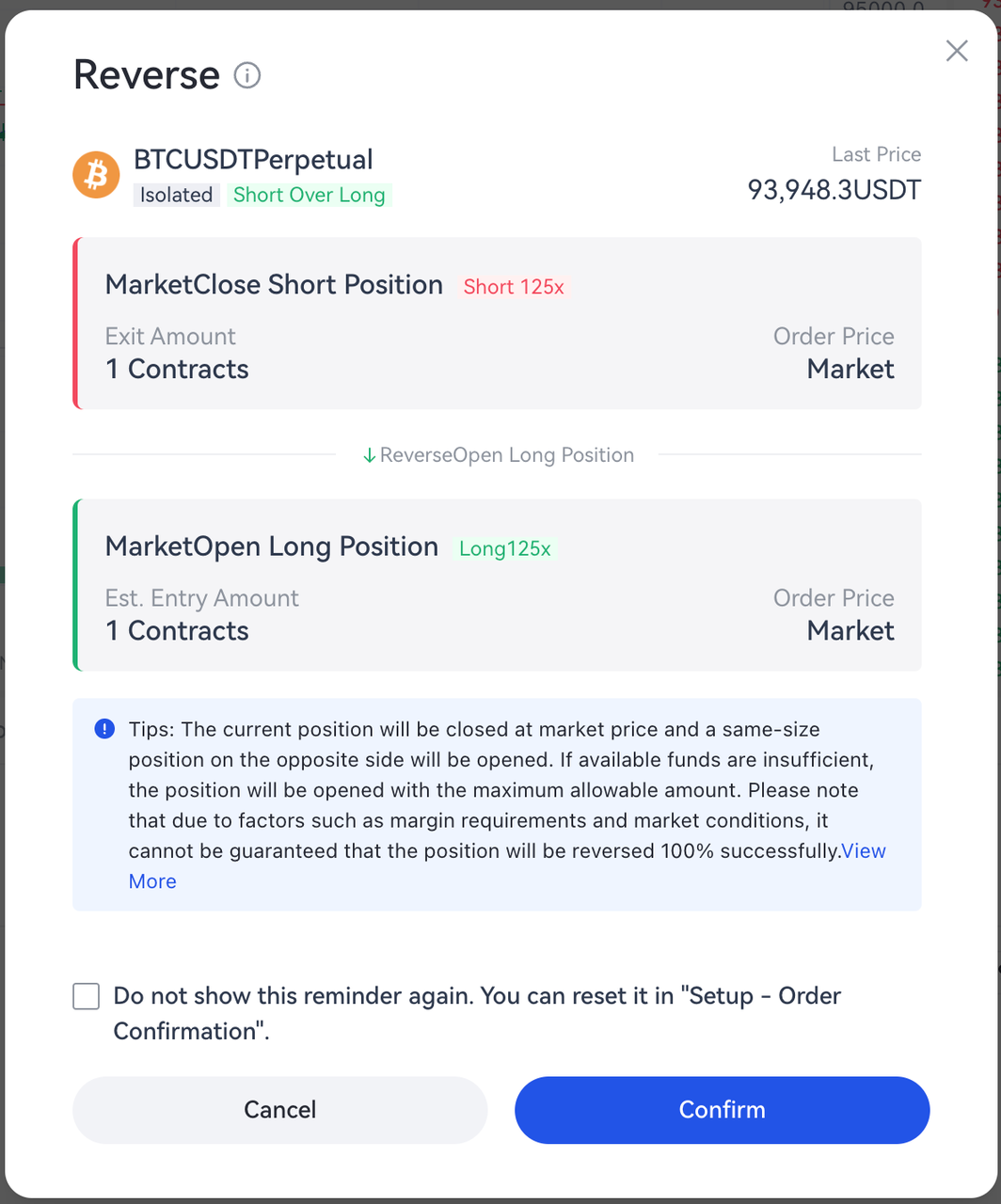
After clicking the [Reverse] button, a confirmation pop-up will appear. The pop-up displays details such as the contract name, reverse side, order price, and order amount. Review the details and click [Confirm] to reverse the position.
App Version
-
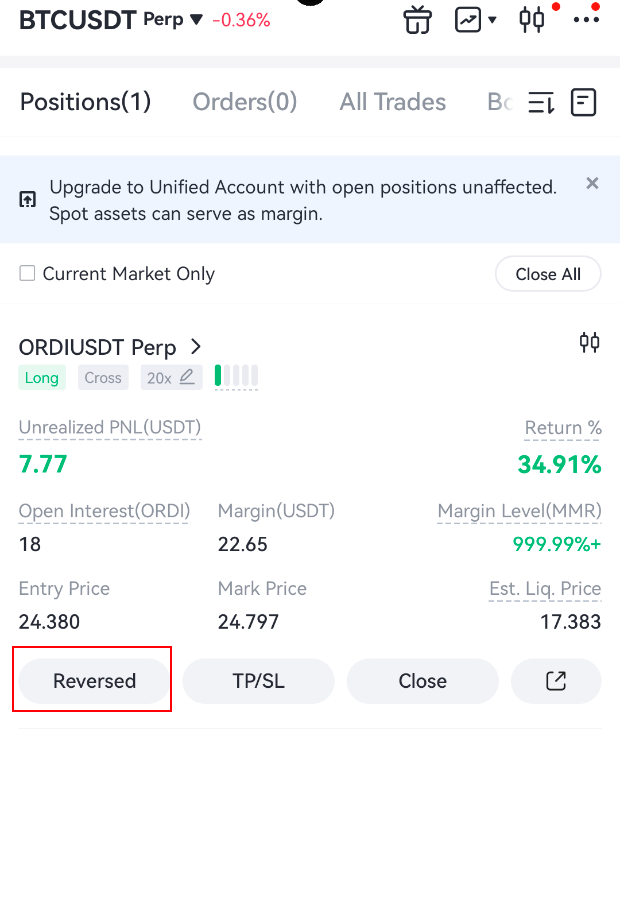
You can see the [Reverse] button in the [Positions] tab on the futures trading page.
-
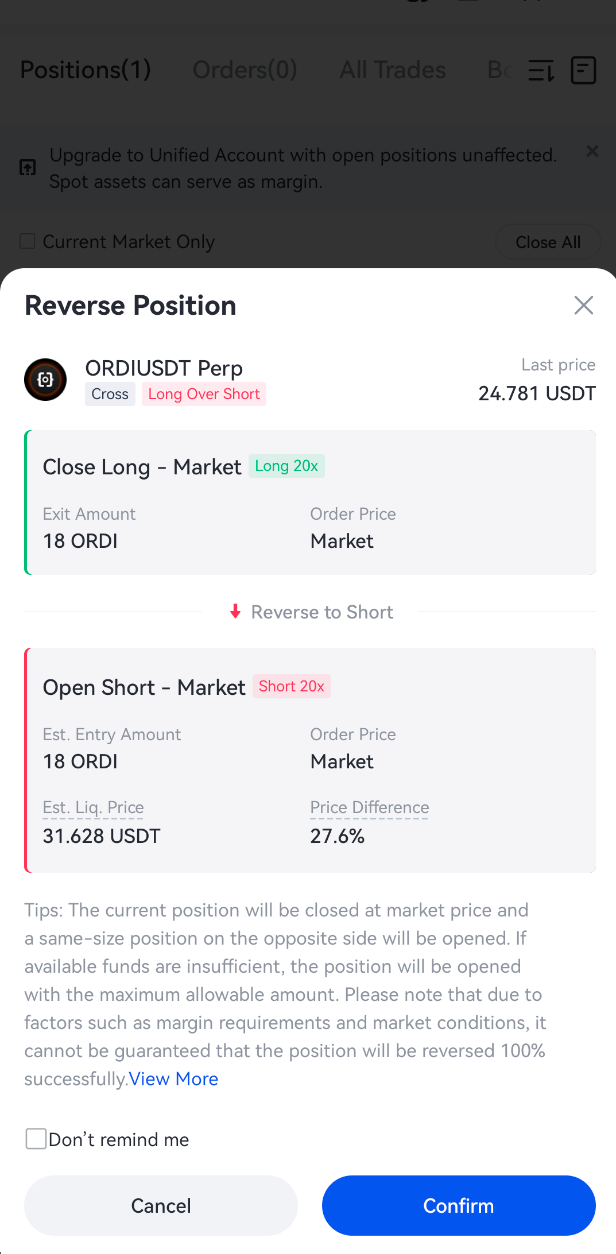
After tapping the [Reverse] button, a confirmation pop-up will appear. The pop-up displays details such as the contract name, reverse side, order price, and order amount. Review the details and tap [Confirm] to reverse the position.
Example
If a trader currently holds a 0.1 BTC long position:
After confirming and clicking the [Reverse] button, the system will close the existing 0.1 BTC long position at market price, and open a 0.1 BTC short position at market price. Once executed, the new position becomes a 0.1 BTC short position.
If the available margin is insufficient, the system may open a smaller reverse position based on available margin. In addition, the reverse position size is subject to the maximum order size per market order for the corresponding contract. During periods of high market volatility, successful position reversal cannot be guaranteed.
Trigger Reverse
Web Version
-
You can see the [Trigger Reverse] button on the right side of the [Positions] tab on the futures trading page.

-
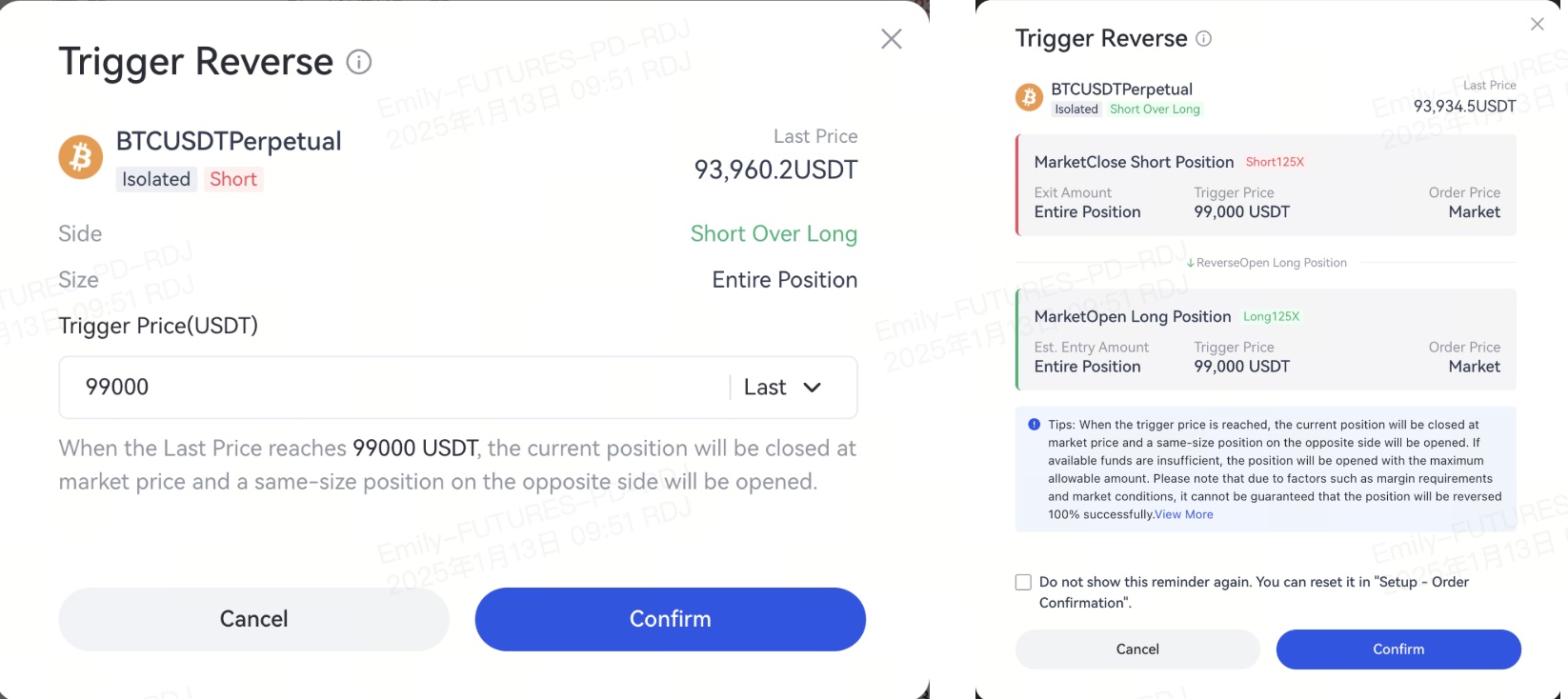
Set a trigger price for Trigger Reverse and click [Confirm]. A confirmation pop-up will appear, displaying details such as the contract name, last price, trigger price, order price, and order amount. Review the details and click [Confirm] to complete the Trigger Reverse setup.
App Version
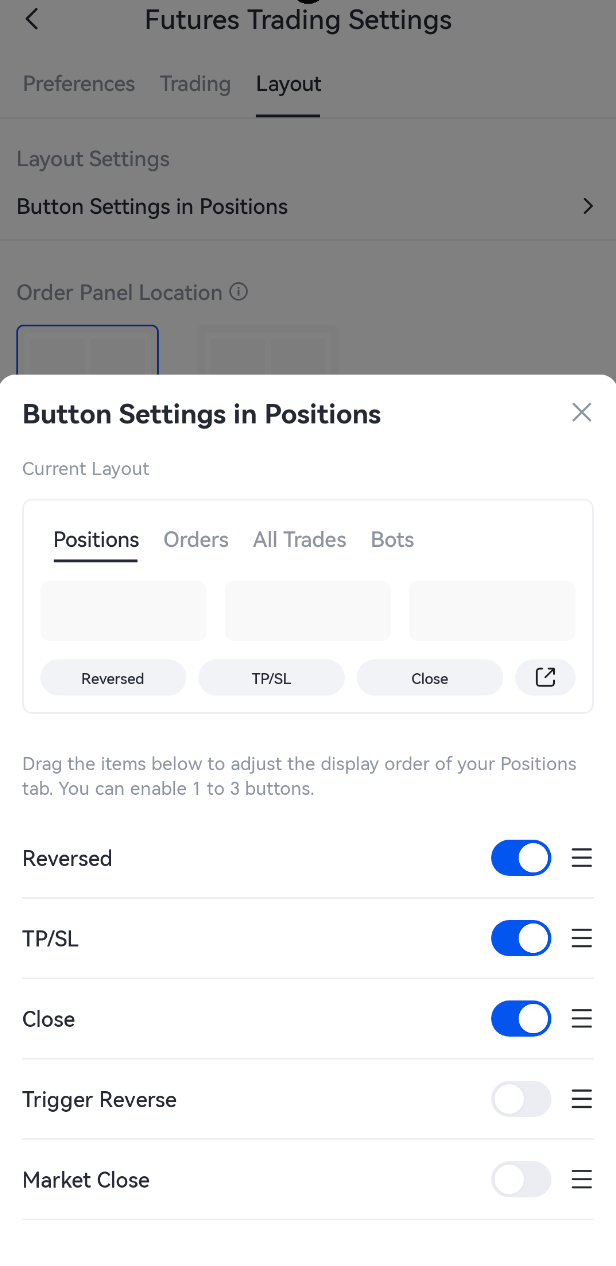
- Go to [Settings] - [Layout] - [Button Settings in Positions] on the futures trading page, and enable [Trigger Reverse].
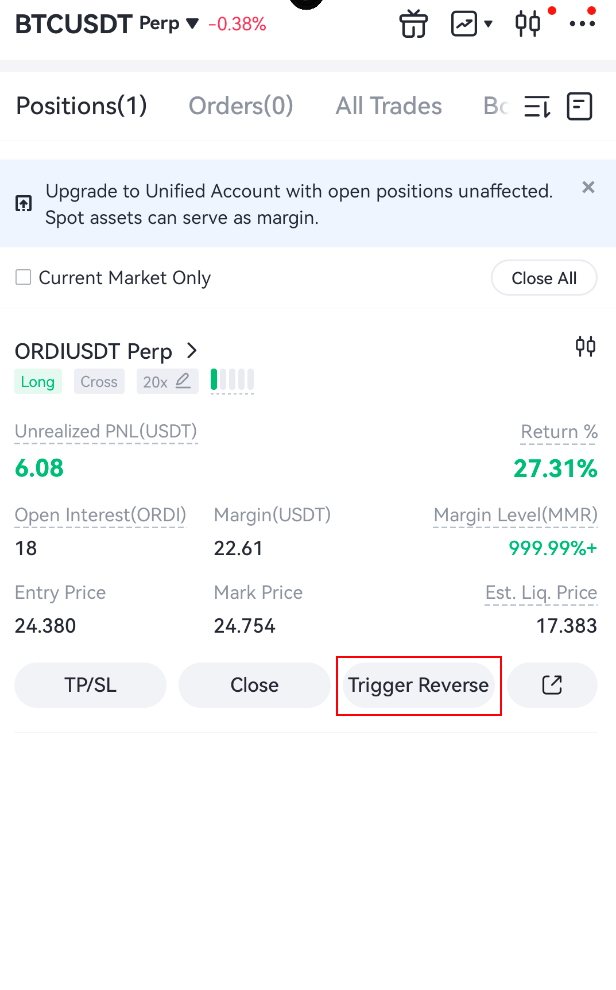
- You can see the [Trigger Reverse] button in the [Positions] tab.
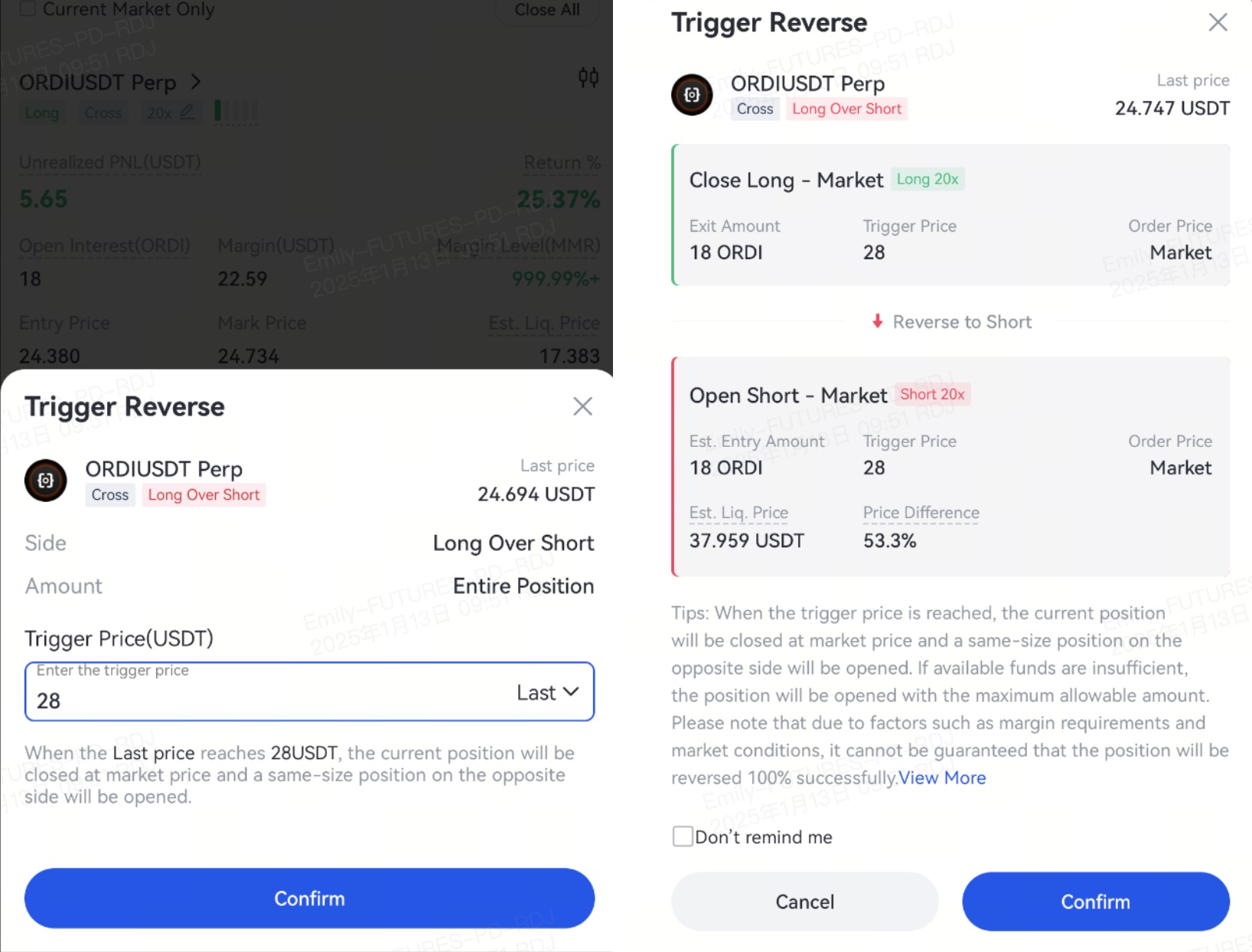
- Set a trigger price for Trigger Reverse and tap [Confirm]. A confirmation pop-up will appear, displaying details such as the contract name, last price, trigger price, order price, and order amount. Review the details and tap [Confirm] to complete the Trigger Reverse setup.
Example
If a trader holds a 0.1 BTC long position when BTC is priced at 90,000 USDT, and sets a Trigger Reverse with a trigger price of 93,000 USDT:
When the BTC price reaches 93,000 USDT, Trigger Reverse is triggered. The system will close the existing 0.1 BTC long position at market price, and open a 0.1 BTC short position at market price. After execution, the new position becomes a 0.1 BTC short position.
Notice
- When reversing a position (including Reverse and Trigger Reverse), the leverage and position size remain unchanged, while the position side is reversed.
- During the reverse position process (including Reverse and Trigger Reverse), the system will cancel all open orders in the same contract market to prevent duplicate reverse positions.
- In one-way mode, the system submits a reverse order with double the original position size at the best available market price. The reverse order will appear as a single order with double size in [Order History]. In hedge mode, the system submits a reverse order based on the current position size at the best available market price.
- Possible Reasons for Reverse and Trigger Reverse Failure
- No available counterparty orders in the market, so the original position remains unchanged.
- Insufficient available balance may result in position reduction only, without opening a reverse position.
- Insufficient margin after reversal may cause the new position to be liquidated shortly after execution.
Gate reserves the final right to interpret the product.
For further assistance, please visit the Gate official support page or contact our customer support team.
Disclaimer
The content provided herein is for reference and educational purposes only and does not constitute any financial, investment, trading, or legal advice, nor does it constitute an offer or solicitation to buy or sell any digital assets. Gate makes no express or implied representations or warranties regarding the accuracy, completeness, or timeliness of the information contained herein. Product features, interfaces, rules, and fee structures may be updated or adjusted at any time. Please refer to the latest announcements and the actual information displayed on the Gate platform for the most accurate details.
Digital asset investments involve significant risk, and prices may fluctuate substantially. You may lose the entire amount of your investment. Please make decisions cautiously based on your own financial situation and risk tolerance after fully understanding the associated risks. If necessary, you are advised to consult an independent professional financial or legal advisor.
For more information about potential risks, please refer to Gate's Risk Disclosure and User Agreement.
